

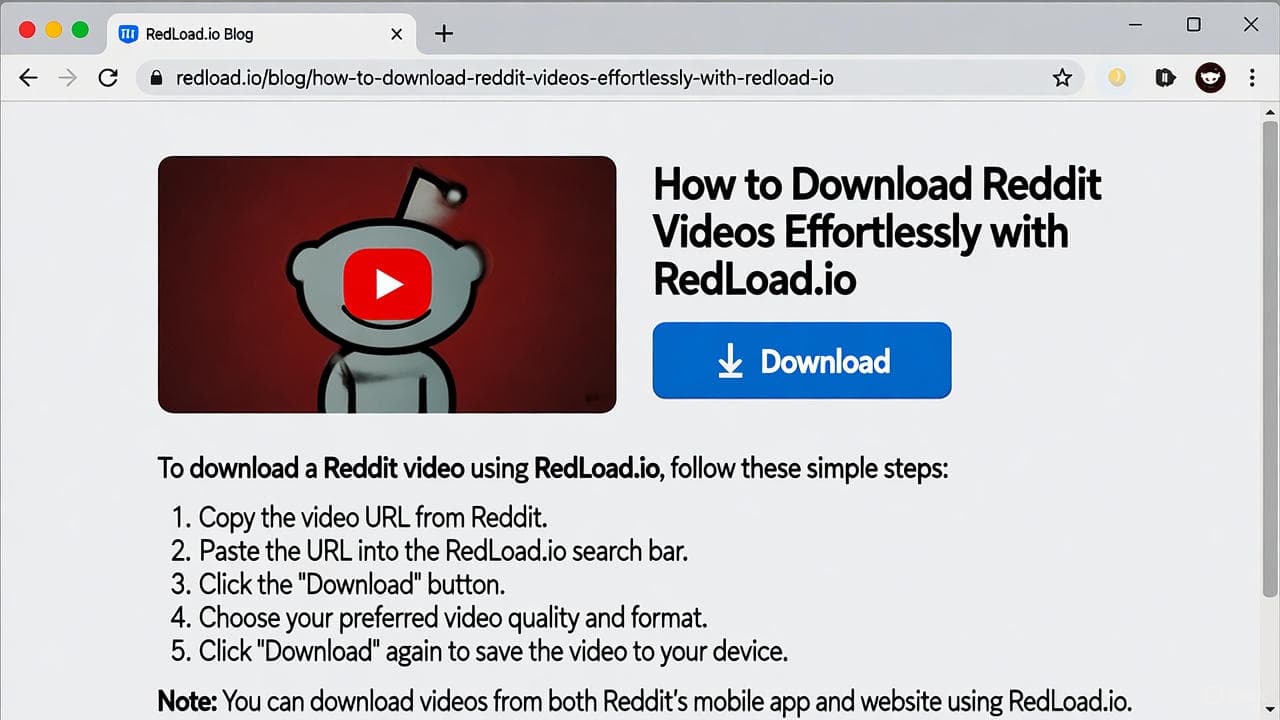
How to Download Reddit Videos Effortlessly with RedLoad.io
In the fast-paced world of social media, Reddit stands out as a treasure trove of entertaining, informative, and viral videos. Whether it’s a hilarious meme from r/funny, a tutorial from r/LearnUselessTalents, or a heartwarming clip from r/MadeMeSmile, sometimes you just want to save that content offline. That’s where RedLoad.io comes in—a simple, browser-based tool designed to make downloading Reddit videos a breeze. In this article, we’ll walk you through how to use RedLoad.io, its key features, and why it’s the go-to choice for Reddit enthusiasts in 2025.
Why Choose RedLoad.io for Downloading Reddit Videos?
With countless downloaders out there, what sets RedLoad.io apart? Here’s a quick rundown:
- No-Fuss Experience : Forget about installing apps, dealing with ads, or signing up. RedLoad.io works entirely in your browser, making it accessible from any device—desktop, mobile, or tablet.
- High-Quality Downloads : Videos are saved in HD MP4 format, complete with audio. The tool automatically merges separate video and audio streams, so you get a polished file without needing extra editing software.
- Privacy-Focused : No tracking, no data collection, and no watermarks. Your downloads are clean and private, respecting both your privacy and the original creators’ rights.
- Speed and Reliability : Processing happens in seconds, even for larger files. Plus, it supports multiple resolutions, letting you pick the quality that suits your needs.
RedLoad.io is built for personal, non-commercial use, ensuring you stay on the right side of fair use principles while enjoying your favorite Reddit content offline.
Step-by-Step Guide: Downloading Reddit Videos with RedLoad.io
Getting started is incredibly straightforward. Follow these steps to download any Reddit video or GIF:
- Find and Copy the Reddit Video Link : Head to Reddit (via the app or website) and locate the post with the video you want. Click the “Share” button below the post. Select “Copy link” to grab the direct URL. Make sure it’s the post link (e.g., reddit.com/r/subreddit/comments/post_id/), not just the embedded player.
- Paste the Link into RedLoad.io : Visit redload.io . In the input field on the homepage, paste the URL (right-click and paste or use Ctrl+V/Cmd+V).
- Download Your Video : Click the “Download” button. RedLoad.io will quickly analyze the link and prepare your options. Choose your preferred resolution from the available qualities. Hit download, and the file will save directly to your device—audio included!
If you encounter any issues, like a video not loading, double-check that the link is from a public post. For more tips, check out the How to Use guide on the site.
Tips for the Best Experience
- Browser Compatibility : RedLoad.io works best on modern browsers like Chrome, Firefox, or Safari. If you’re on mobile, it handles downloads seamlessly without redirects.
- Batch Downloads : While the tool processes one link at a time, you can open multiple tabs for efficiency when saving several videos.
- Respect Content Creators : Always use downloaded videos for personal viewing. Sharing or repurposing without permission could violate copyrights—RedLoad.io encourages ethical use.
Why RedLoad.io is Essential in 2025
As Reddit continues to evolve with more video content, tools like RedLoad.io become indispensable. Whether you’re archiving educational clips, saving reaction videos for offline laughs, or building a personal library, this tool simplifies the process without the clutter of competitors. Plus, with no paywalls or extensions required, it’s truly user-friendly.
Ready to try it out? Head over to redload.io and start downloading today. If you have feedback or suggestions, the team behind RedLoad.io is always open to improving the experience—check the About Us page for more details.
What are you waiting for? Unlock the full potential of Reddit’s video world with RedLoad.io!
Ready to save your own copy?
Paste any Reddit video link and download it in seconds — with sound.

Editor · RedLoad Guides
Lauren Dosela is a digital content writer and technology enthusiast who covers social media, online platforms, and practical web tools. She specializes in turning complex digital topics into clear, useful, and easy-to-follow guides for everyday readers.
Related Guides
Comments
Comments are saved only on this device/browser — they are not shared with other visitors yet.